


Thứ Bảy, 21 Tháng 2 , 2026
NEWS
MANHPC
  • Trang chủ
  • HƯỚNG DẪN
    Hướng dẫn chặn cập nhật driver GPU qua Windows Update

    Hướng dẫn chặn cập nhật driver GPU qua Windows Update

    Hướng dẫn tăng số lượng kết nối Remote Desktop trên Windows

    Hướng dẫn tăng số lượng kết nối Remote Desktop trên Windows

    Hướng dẫn rebuild bộ cài Windows – Phần 3

    Hướng dẫn rebuild bộ cài Windows – Phần 2

  • HỆ ĐIỀU HÀNH
    • MANHPC
      • NEWEST
      • NEWEST UPDATE
      • MOST VIEW
    • TIN TỨC
      • WINDOWS INSIDER
  • WINDOWS PE
    AnkhTech WinPE v15

    AnkhTech WinPE

    Tổng hợp một số công cụ sao lưu và phục hồi dữ liệu

    Tổng hợp một số công cụ sao lưu và phục hồi dữ liệu

    Tổng hợp một số công cụ quản lý và phân vùng đĩa cứng

    Tổng hợp một số công cụ quản lý và phân vùng đĩa cứng

    Tổng hợp một số công cụ gỡ bỏ mật khẩu Windows

    Tổng hợp một số công cụ gỡ bỏ mật khẩu Windows

  • SERIES
    • HƯỚNG DẪN REBUILD WINDOWS
      • Phần 1
      • Phần 2
      • Phần 3
    • HƯỚNG DẪN CẤU HÌNH FILE TRẢ LỜI TỰ ĐỘNG
      • Phần 1
      • Phần 2
      • Phần 3
      • Phần 4
      • Phần 5
    • BỘ CÀI WINDOWS NGUYÊN GỐC
      • Windows 11
      • Windows 10
    • BỘ CÀI WINDOWS 11
      • Windows 11 25H2
      • Windows 11 24H2
      • Windows 11 23H2
      • Windows 11 22H2
      • Windows 11 21H2
      • Windows 11 LTSC
    • BỘ CÀI WINDOWS 10
      • Windows 10 22H2
      • Windows 10 21H2
      • Windows 10 21H1 và 2004
      • Windows 10 LTSC
    • BỘ CÀI WINDOWS 7
  • TOPIC
    • WINDOWS ENTERPRISE
    • WINDOWS ENTERPRISE G
    • WINDOWS ENTERPRISE LTSC
    • WINDOWS PRO WORKSTATION
    • WINDOWS PRO
  • DONATE
  • DỊCH VỤ
  • LIÊN HỆ
Không có kết quả
Xem tất cả kết quả
MANHPC
  • Trang chủ
  • HƯỚNG DẪN
    Hướng dẫn chặn cập nhật driver GPU qua Windows Update

    Hướng dẫn chặn cập nhật driver GPU qua Windows Update

    Hướng dẫn tăng số lượng kết nối Remote Desktop trên Windows

    Hướng dẫn tăng số lượng kết nối Remote Desktop trên Windows

    Hướng dẫn rebuild bộ cài Windows – Phần 3

    Hướng dẫn rebuild bộ cài Windows – Phần 2

  • HỆ ĐIỀU HÀNH
    • MANHPC
      • NEWEST
      • NEWEST UPDATE
      • MOST VIEW
    • TIN TỨC
      • WINDOWS INSIDER
  • WINDOWS PE
    AnkhTech WinPE v15

    AnkhTech WinPE

    Tổng hợp một số công cụ sao lưu và phục hồi dữ liệu

    Tổng hợp một số công cụ sao lưu và phục hồi dữ liệu

    Tổng hợp một số công cụ quản lý và phân vùng đĩa cứng

    Tổng hợp một số công cụ quản lý và phân vùng đĩa cứng

    Tổng hợp một số công cụ gỡ bỏ mật khẩu Windows

    Tổng hợp một số công cụ gỡ bỏ mật khẩu Windows

  • SERIES
    • HƯỚNG DẪN REBUILD WINDOWS
      • Phần 1
      • Phần 2
      • Phần 3
    • HƯỚNG DẪN CẤU HÌNH FILE TRẢ LỜI TỰ ĐỘNG
      • Phần 1
      • Phần 2
      • Phần 3
      • Phần 4
      • Phần 5
    • BỘ CÀI WINDOWS NGUYÊN GỐC
      • Windows 11
      • Windows 10
    • BỘ CÀI WINDOWS 11
      • Windows 11 25H2
      • Windows 11 24H2
      • Windows 11 23H2
      • Windows 11 22H2
      • Windows 11 21H2
      • Windows 11 LTSC
    • BỘ CÀI WINDOWS 10
      • Windows 10 22H2
      • Windows 10 21H2
      • Windows 10 21H1 và 2004
      • Windows 10 LTSC
    • BỘ CÀI WINDOWS 7
  • TOPIC
    • WINDOWS ENTERPRISE
    • WINDOWS ENTERPRISE G
    • WINDOWS ENTERPRISE LTSC
    • WINDOWS PRO WORKSTATION
    • WINDOWS PRO
  • DONATE
  • DỊCH VỤ
  • LIÊN HỆ
Không có kết quả
Xem tất cả kết quả
MANHPC
Không có kết quả
Xem tất cả kết quả
TRANG CHỦ TIN TỨC WINDOWS INSIDER

KB5077232 Windows 11 Insider Dev build 26300.7877 (25H2)

NỘI DUNG BÀI VIẾT

  1. Changes and Improvements gradually being rolled out with toggle on*
    1. [Context Menu]
    2. [Settings]
    3.  [Taskbar & System Tray]
    4. [File Explorer]
    5. [Nearby Sharing]
  2. Paint App update rolling out
  3. Reminders for Windows Insiders in the Dev Channel

Hello Windows Insiders, today we are releasing Windows 11 Insider Preview Build 26300.7877 (KB5077232) to the Dev Channel.

Changes in Dev Channel builds and updates are documented in two buckets: new features, and improvements (including notable fixes) that are being gradually rolled out for Insiders who have turned on the toggle to get the latest updates as they are available (via Settings > Windows Update*) and then new features, and improvements (including notable fixes) rolling out to everyone in the Dev Channel. For more information, see the Reminders section at the bottom of this blog.

Changes and Improvements gradually being rolled out with toggle on*

[Context Menu]

  • When right clicking on a .exe, .bat, or .cmd file, the context menu’s “Open” verb will now match the icon associated with the file’s default app.
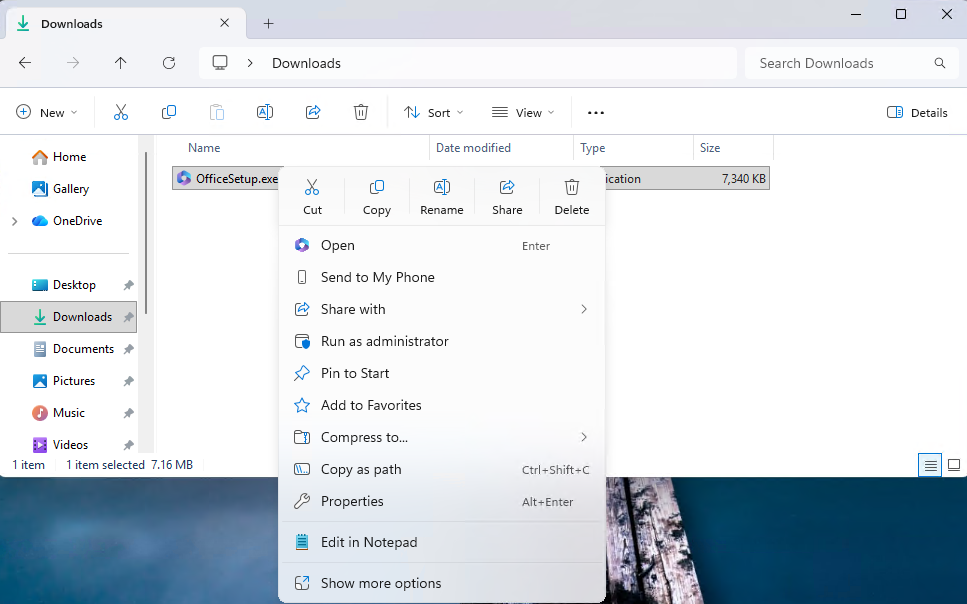
The context menu’s “Open” verb matches the icon in the default app.
  • Feedback: Share your thoughts in Feedback Hub (WIN + F) under File Folders and Online Storage > File Explorer.

[Settings]

  • Device Cards:
    • Previously released to WIP channels June 2025, the ‘Device info’ Card on the Settings Home page has been refined based on early learnings. This update simplifies key device specifications and improves consistency across the end to end flow from the Home Card to the Settings > System > About page, making information easier to scan and understand. This consumer experience is currently rolling out to Insiders in the United States.
    • A version of the Device info Card intended for enterprise users on IT managed devices continues to be available.
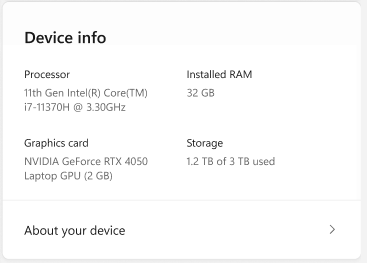
Device card with simplified device specifications.
  • In Settings > System > About, based on early customer feedback, key device hardware details are once again prominently displayed at the top of the page, making it easy to understand your device at a glance. The Device information section now brings together additional system details such as graphics and storage information in a single location, with easy copy/paste support to simplify sharing or support scenarios. Device related frequently asked questions are not currently surfaced as we continue iterating the best way to deliver contextual help across Settings.
  • Feedback: Share your thoughts in Feedback Hub (WIN + F) under the Settings category.

 [Taskbar & System Tray]

  • We have improved the animations for mousing over app groups on the taskbar.
  • Improved reliability of showing app icons in the system tray when the taskbar was set to autohide.

[File Explorer]

  • Addressed an issue where all File Explorer open windows and tabs might unexpectedly jump to Desktop or Home.

[Nearby Sharing]

  • Improved the reliability of sending larger files using nearby sharing.

Paint App update rolling out

  • With Paint version 11.2601.391.0, we’re excited to introduce freeform rotate, a highly requested feature that gives you more control when editing your artwork. You can now rotate shapes, text, and any active selection to any angle. To get started, open Paint and select a shape, text, or selection. When the object is active, use the rotate handle above it to rotate freely in any direction. For more precise control, you can also choose Custom rotate from the Rotate menu and enter a specific angle. Try using freeform rotate in your artwork to adjust elements exactly the way you want and add more flexibility to your creative workflow.
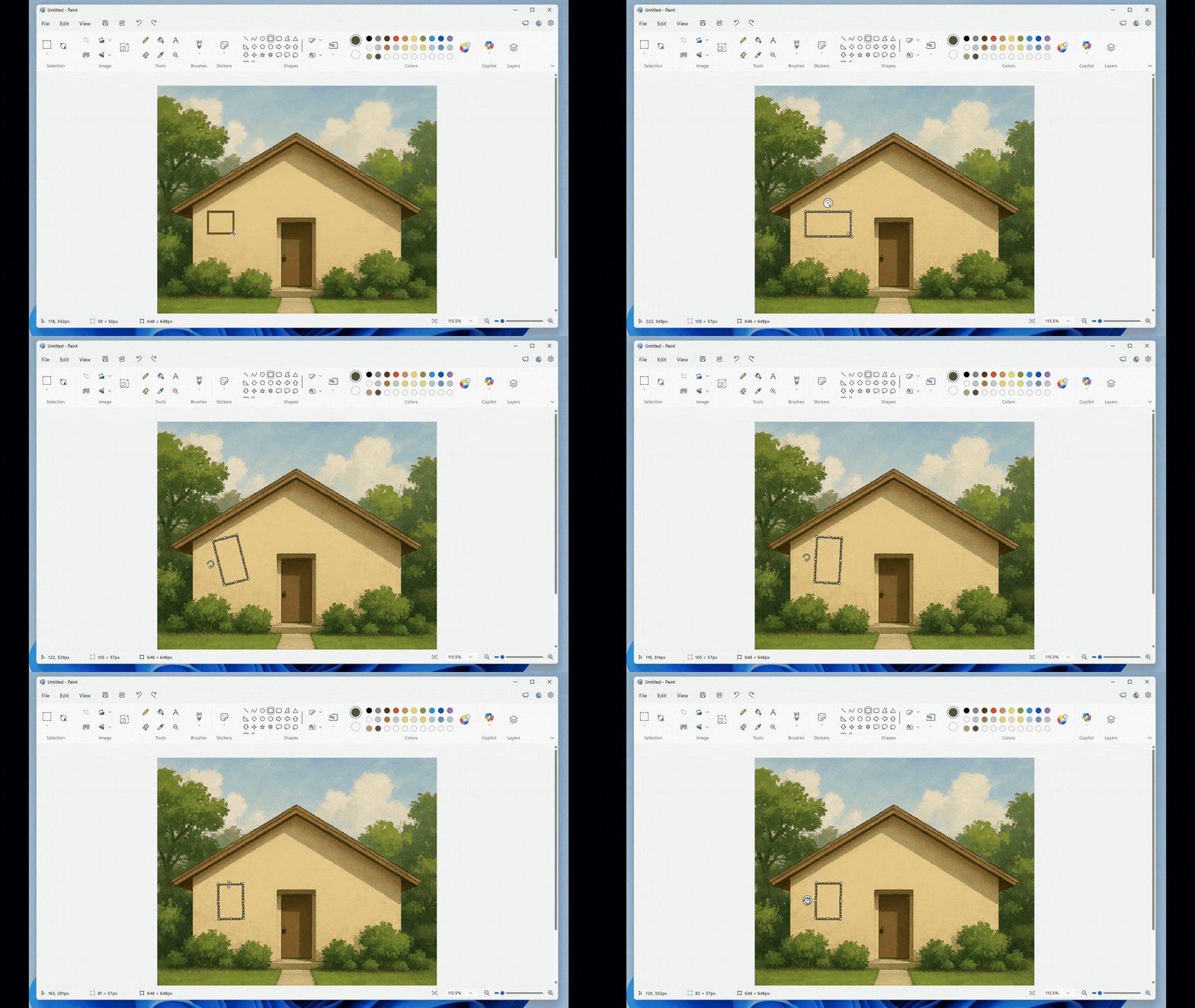
Paint App GIF showing freeform rotate.
  • FEEDBACK: Please file feedback in Feedback Hub (WIN + F) under Apps > Paint.

Reminders for Windows Insiders in the Dev Channel

  • Updates are based on Windows 11, version 25H2 via an enablement package (Build 26300.7877).
  • Many features are rolled out using Controlled Feature Rollout technology, starting with a subset of Insiders and ramping up over time as we monitor feedback to see how they land before pushing them out to everyone in this channel.
  • The desktop watermark shown at the lower right corner of the desktop is normal for Windows Insider pre-release builds.
  • For Windows Insiders who want to be the first to get features gradually rolled out to you, you can turn ON the toggle to get the latest updates as they are available via Settings > Windows Update*. Over time, we will increase the rollouts of features to everyone with the toggle turned on. Should you keep this toggle off, new features will gradually be rolled out to your PC over time once they are ready.
  • Features and experiences included in these builds may never get released as we try out different concepts and get feedback. Features may change over time, be removed, or replaced and never get released beyond Windows Insiders. Some of these features and experiences could show up in future Windows releases when they’re ready.
  • Some features in active development we preview with Windows Insiders may not be fully localized and localization will happen over time as features are finalized. As you see issues with localization in your language, please report those issues to us via Feedback Hub.
  • Check out Flight Hub for a complete look at what build is in which Insider channel.

Thanks,
Windows Insider Program Team

Source:https://blogs.windows.com/windows-insider/2026/02/20/announcing-windows-11-insider-preview-build-26300-7877-dev-channel/

Windows Update Logo

Thẻ: Dev Channel
BÀI TRƯỚC

KB5077230 Windows 11 Insider Canary build 28020.1619 (26H1)

BÀI TIẾP THEO

KB5077231 Windows 11 Insider Beta build 26220.7872 (25H2)

BÀI VIẾT TƯƠNG TỰ

Windows 11 Insider Canary
WINDOWS INSIDER

KB5077230 Windows 11 Insider Canary build 28020.1619 (26H1)

21 Tháng 2, 2026
0
Windows 11 Insider Canary
WINDOWS INSIDER

Windows 11 Insider Canary build 29531.1000

19 Tháng 2, 2026
1
WINDOWS INSIDER

KB5077223 Windows 11 Insider Beta build 26220.7859 (25H2)

19 Tháng 2, 2026
1
WINDOWS INSIDER

KB5077202 Windows 11 Insider Dev build 26300.7760 (25H2)

11 Tháng 2, 2026
4
WINDOWS INSIDER

KB5077201 Windows 11 Insider Beta build 26220.7755 (25H2)

11 Tháng 2, 2026
1
Windows 11 Insider Canary
WINDOWS INSIDER

KB5074176 Windows 11 Insider Canary build 28020.1546 (26H1)

5 Tháng 2, 2026
16
0 0 Phiếu bầu
Article Rating
Theo dõi
Đăng nhập
Notify of
guest

guest

0 BÌNH LUẬN
Inline Feedbacks
Xem tất cả các bình luận

BỘ CÀI WINDOWS ĐƯỢC YÊU THÍCH

Bộ cài Windows 10 Pro 22H2

Bộ cài Windows 10 Pro 22H2 x64

8 Tháng 12, 2025
64.1k
Bộ cài Windows 10 version 22H2 nguyên gốc

Bộ cài Windows 10 version 22H2 nguyên gốc

8 Tháng 12, 2025
26.8k
Bộ cài Windows 10 Enterprise LTSC 2021

Bộ cài Windows 10 Enterprise LTSC 2021

8 Tháng 12, 2025
22.7k
Bộ cài Windows 11 All In One

Bộ cài Windows 11 26H1 All In One

19 Tháng 2, 2026
22k
Bộ cài Windows 10 All In One

Bộ cài Windows 10 22H2 All In One

8 Tháng 12, 2025
18.4k
Bộ cài Windows 7 Ultimate All In One

Bộ cài Windows 7 Ultimate

1 Tháng 7, 2025
15.8k
Bộ cài Windows 7 SP1 All In One

Bộ cài Windows 7 SP1 All In One

8 Tháng 12, 2025
14.9k
Bộ cài Windows 10 Enterprise LTSC 2019

Bộ cài Windows 10 Enterprise LTSC 2019

8 Tháng 12, 2025
14.7k
Bộ cài Windows 11 Pro version 22H2

Bộ cài Windows 11 Pro version 22H2

8 Tháng 12, 2025
14.5k
Bộ cài Windows 10 Pro version 21H2 x64

Bộ cài Windows 10 Pro version 21H2 x64

4 Tháng 7, 2025
13.2k

BỘ CÀI WINDOWS MỚI

Bộ cài Windows 11 Pro 25H2

Bộ cài Windows 11 Pro 25H2

8 Tháng 12, 2025
1.1k
Bộ Cài Windows 11 Pro Workstation 25H2

Bộ cài Windows 11 Pro for Workstations 25H2

8 Tháng 12, 2025
365
Bộ Cài Windows 11 Enterprise 25H2

Bộ cài Windows 11 Enterprise 25H2

8 Tháng 12, 2025
415

Bộ cài Windows 11 Enterprise GS 25H2

8 Tháng 12, 2025
528
Bộ cài Windows 11 Enterprise G 25H2

Bộ cài Windows 11 Enterprise G 25H2

8 Tháng 12, 2025
243
Bộ cài Windows 11 Enterprise LTSC 25H2

Bộ cài Windows 11 Enterprise LTSC 25H2

8 Tháng 12, 2025
966
Windows 11 25h2 nguyên dốc

Bộ cài Windows 11 25H2 nguyên gốc

12 Tháng 2, 2026
884
Bộ cài Windows 10 Enterprise GS 22H2

Bộ cài Windows 10 Enterprise GS version 22H2

8 Tháng 12, 2025
1.3k
Bộ cài Windows 10 Pro for Workstation 22H2

Bộ cài Windows 10 Pro for Workstations version 22H2

31 Tháng 7, 2025
1.7k
Bộ cài Windows 10 Enterprise G 22H2

Bộ cài Windows 10 Enterprise G 22H2

8 Tháng 12, 2025
552

DONATE MANHPC.COM

BÀI TIẾP THEO

KB5077231 Windows 11 Insider Beta build 26220.7872 (25H2)

MANHPC

Website chia sẻ kiến thức Hệ điều hành Windows miễn phí

Email: contact@manhpc.com

DMCA.com Protection Status

SERIES BÀI VIẾT

  • Hướng dẫn Rebuild Windows

  • Hướng dẫn cấu hình file trả lời tự động

  • Bộ cài Windows 7

  • Bộ cài Windows 10

  • Bộ cài Windows 11

  • Bộ cài Windows nguyên gốc

© 2025 MANHPC BLOG

Trang chủ   Liên hệ   Chính sách bảo mật   Sơ đồ trang   Donate

Không có kết quả
Xem tất cả kết quả
  • TRANG CHỦ
  • HƯỚNG DẪN
  • HỆ ĐIỀU HÀNH
    • MANHPC
      • NEWEST
      • NEWEST UPDATE
      • MOST VIEW
    • TIN TỨC
      • WINDOWS INSIDER
  • WINDOWS PE
  • SERIES
    • HƯỚNG DẪN REBUILD WINDOWS
    • HƯỚNG DẪN CẤU HÌNH FILE TRẢ LỜI TỰ ĐỘNG
    • BỘ CÀI WINDOWS NGUYÊN GỐC
      • Windows 11
      • Windows 10
    • BỘ CÀI WINDOWS 11
      • Windows 11 25H2
      • Windows 11 24H2
      • Windows 11 23H2
      • Windows 11 22H2
      • Windows 11 21H2
      • Windows 11 LTSC
    • BỘ CÀI WINDOWS 10
      • Windows 10 22H2
      • Windows 10 21H2
      • Windows 10 21H1 và 2004
      • Windows 10 LTSC
    • BỘ CÀI WINDOWS 7
  • CHỦ ĐỀ
  • GOOGLE NEWS
  • DONATE
  • DỊCH VỤ
  • LIÊN HỆ

© 2021 ManhPC Blog - All Right Reserved.

Liên hệ
Fanpage
wpDiscuz