

Chủ Nhật, 11 Tháng 1 , 2026
NEWS
MANHPC
  • Trang chủ
  • HƯỚNG DẪN
    Hướng dẫn chặn cập nhật driver GPU qua Windows Update

    Hướng dẫn chặn cập nhật driver GPU qua Windows Update

    Hướng dẫn tăng số lượng kết nối Remote Desktop trên Windows

    Hướng dẫn tăng số lượng kết nối Remote Desktop trên Windows

    Hướng dẫn rebuild bộ cài Windows – Phần 3

    Hướng dẫn rebuild bộ cài Windows – Phần 2

  • HỆ ĐIỀU HÀNH
    • MANHPC
      • NEWEST
      • NEWEST UPDATE
      • MOST VIEW
    • TIN TỨC
      • WINDOWS INSIDER
  • WINDOWS PE
    AnkhTech WinPE v15

    AnkhTech WinPE

    Tổng hợp một số công cụ sao lưu và phục hồi dữ liệu

    Tổng hợp một số công cụ sao lưu và phục hồi dữ liệu

    Tổng hợp một số công cụ quản lý và phân vùng đĩa cứng

    Tổng hợp một số công cụ quản lý và phân vùng đĩa cứng

    Tổng hợp một số công cụ gỡ bỏ mật khẩu Windows

    Tổng hợp một số công cụ gỡ bỏ mật khẩu Windows

  • SERIES
    • HƯỚNG DẪN REBUILD WINDOWS
      • Phần 1
      • Phần 2
      • Phần 3
    • HƯỚNG DẪN CẤU HÌNH FILE TRẢ LỜI TỰ ĐỘNG
      • Phần 1
      • Phần 2
      • Phần 3
      • Phần 4
      • Phần 5
    • BỘ CÀI WINDOWS NGUYÊN GỐC
      • Windows 11
      • Windows 10
    • BỘ CÀI WINDOWS 11
      • Windows 11 25H2
      • Windows 11 24H2
      • Windows 11 23H2
      • Windows 11 22H2
      • Windows 11 21H2
      • Windows 11 LTSC
    • BỘ CÀI WINDOWS 10
      • Windows 10 22H2
      • Windows 10 21H2
      • Windows 10 21H1 và 2004
      • Windows 10 LTSC
    • BỘ CÀI WINDOWS 7
  • TOPIC
    • WINDOWS ENTERPRISE
    • WINDOWS ENTERPRISE G
    • WINDOWS ENTERPRISE LTSC
    • WINDOWS PRO WORKSTATION
    • WINDOWS PRO
  • DONATE
  • DỊCH VỤ
  • LIÊN HỆ
Không có kết quả
Xem tất cả kết quả
MANHPC
  • Trang chủ
  • HƯỚNG DẪN
    Hướng dẫn chặn cập nhật driver GPU qua Windows Update

    Hướng dẫn chặn cập nhật driver GPU qua Windows Update

    Hướng dẫn tăng số lượng kết nối Remote Desktop trên Windows

    Hướng dẫn tăng số lượng kết nối Remote Desktop trên Windows

    Hướng dẫn rebuild bộ cài Windows – Phần 3

    Hướng dẫn rebuild bộ cài Windows – Phần 2

  • HỆ ĐIỀU HÀNH
    • MANHPC
      • NEWEST
      • NEWEST UPDATE
      • MOST VIEW
    • TIN TỨC
      • WINDOWS INSIDER
  • WINDOWS PE
    AnkhTech WinPE v15

    AnkhTech WinPE

    Tổng hợp một số công cụ sao lưu và phục hồi dữ liệu

    Tổng hợp một số công cụ sao lưu và phục hồi dữ liệu

    Tổng hợp một số công cụ quản lý và phân vùng đĩa cứng

    Tổng hợp một số công cụ quản lý và phân vùng đĩa cứng

    Tổng hợp một số công cụ gỡ bỏ mật khẩu Windows

    Tổng hợp một số công cụ gỡ bỏ mật khẩu Windows

  • SERIES
    • HƯỚNG DẪN REBUILD WINDOWS
      • Phần 1
      • Phần 2
      • Phần 3
    • HƯỚNG DẪN CẤU HÌNH FILE TRẢ LỜI TỰ ĐỘNG
      • Phần 1
      • Phần 2
      • Phần 3
      • Phần 4
      • Phần 5
    • BỘ CÀI WINDOWS NGUYÊN GỐC
      • Windows 11
      • Windows 10
    • BỘ CÀI WINDOWS 11
      • Windows 11 25H2
      • Windows 11 24H2
      • Windows 11 23H2
      • Windows 11 22H2
      • Windows 11 21H2
      • Windows 11 LTSC
    • BỘ CÀI WINDOWS 10
      • Windows 10 22H2
      • Windows 10 21H2
      • Windows 10 21H1 và 2004
      • Windows 10 LTSC
    • BỘ CÀI WINDOWS 7
  • TOPIC
    • WINDOWS ENTERPRISE
    • WINDOWS ENTERPRISE G
    • WINDOWS ENTERPRISE LTSC
    • WINDOWS PRO WORKSTATION
    • WINDOWS PRO
  • DONATE
  • DỊCH VỤ
  • LIÊN HỆ
Không có kết quả
Xem tất cả kết quả
MANHPC
Không có kết quả
Xem tất cả kết quả
TRANG CHỦ TIN TỨC WINDOWS INSIDER

KB5072046 Windows 11 Insider Dev and Beta build 26220.7535 (25H2)

NỘI DUNG BÀI VIẾT

  1. New features gradually being rolled out with toggle on*
    1. Bringing Copilot-powered image descriptions to Narrator
    2. Uninstalling Microsoft Copilot App on managed devices
  2. Changes and Improvements gradually being rolled out with toggle on*
    1. [For Developers]
    2. [Windows Spotlight]
  3. Fixes gradually being rolled out with toggle on*
    1. [Start menu]
    2. [File Explorer]
    3. [Input]
    4. [Print]
    5. [Windows Update]
  4. Known issues
    1. [Xbox full screen experience for PC]
    2. [Taskbar & System Tray]
    3. [Settings]
    4. [Bluetooth]
    5. [Click to Do]
  5. Reminders for Windows Insiders in the Dev & Beta Channels

Hello Windows Insiders, today we are releasing Windows 11 Insider Preview Build 26220.7535 (KB5072046) to the Dev & Beta Channels.

As a reminder, we are offering the same builds to both the Dev & Beta Channels on Windows 11, version 25H2.

If you are an Insider in the Dev Channel, you now have a window to switch from the Dev Channel to the Beta Channel if you would like. This window is soon closing.

Important: Once we move Dev Channel forward to a higher build number, the opportunity to switch between these channels will close until a future opportunity becomes available.

Note: Insiders who previously had trouble switching channels should be able to do so now.

Changes in Dev & Beta Channel builds and updates are documented in two buckets: new features, improvements, and fixes that are being gradually rolled out for Insiders who have turned on the toggle to get the latest updates as they are available (via Settings > Windows Update*) and then new features, improvements, and fixes rolling out to everyone in the Dev & Beta Channels. For more information, see the Reminders section at the bottom of this blog.

New features gradually being rolled out with toggle on*

Bringing Copilot-powered image descriptions to Narrator

Last year, we introduced rich image descriptions in Narrator on Copilot+ PCs—making it possible for blind and low-vision users to hear detailed, AI-generated descriptions of images, charts, and graphs.

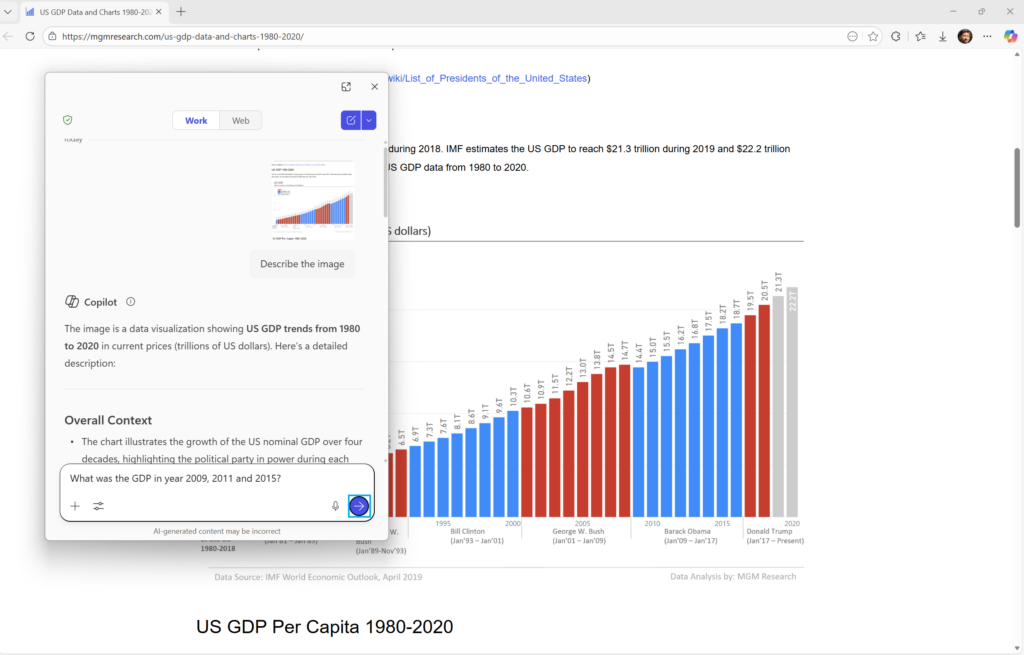
Narrator can now work with Copilot on all Windows 11 devices to further understand images and visual elements on your screen. You can press Narrator key + Ctrl + D to describe the focused image or press Narrator key + Ctrl + S to describe the full screen. Copilot opens with the image ready, allowing you to enter your own prompt and generate a description tailored to what you want to know. Importantly, the image is only shared after you choose to describe it. You remain in control at every step.

On Copilot+ PCs, Narrator continues to provide instant, on-device image descriptions using local AI. Press Narrator key + Ctrl + D/S, and Narrator immediately reads a rich description—highlighting people, objects, colors, text, numbers, and layout. When you want more detail or follow-up insights, simply select Ask Copilot to continue exploring.

This feature is not available in the European Economic Area (EEA).
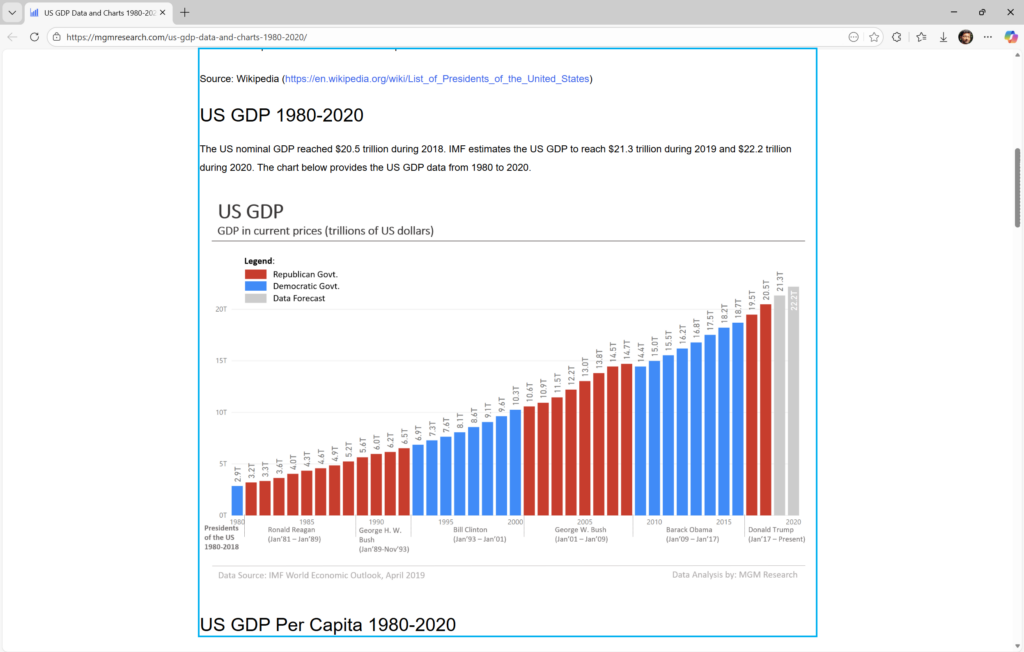
Use Narrator with Copilot to explore trends, labels, and key changes in images and visual elements (example-US GDP growth over several decades).
Explore and ask questions about the images and visual elements using your own words such as details, trends, and summaries.

FEEDBACK: Please file feedback in Feedback Hub (WIN + F) under Accessibility > Narrator.

Uninstalling Microsoft Copilot App on managed devices

Admins can now uninstall Microsoft Copilot for a user in a targeted way by enabling a new policy titled RemoveMicrosoftCopilotApp. It will apply for devices/users that meet the below conditions:

  • Microsoft 365 Copilot and Microsoft Copilot are both installed
  • The Microsoft Copilot app was not installed by the user
  • The Microsoft Copilot app was not launched in the last 28 days

If this policy is enabled, the Microsoft Copilot app will be uninstalled, once. Users can still re-install if they choose to. This policy is available on Enterprise, Pro, and EDU SKUs.

To enable this policy, open the Group policy editor and go to: User Configuration -> Administrative Templates -> Windows AI -> Remove Microsoft Copilot App.

FEEDBACK: Please share your feedback in Feedback Hub (WIN + F) under Desktop Environment > Taskbar.

Changes and Improvements gradually being rolled out with toggle on*

[For Developers]

  • We’re excited to share an enhancement to the Cross Device Resume capability that we announced earlier. Until now, app developers could integrate with Resume using a solution based on the Link to Windows app. We’ve now introduced an additional integration path leveraging the Windows Notification System (WNS). This additional option expands the scope of users to whom you can offer Resume capability, while delivering the same seamless experience on Windows. We invite developers to explore onboarding with this new capability alongside the existing integration method. Together, these options help maximize continuity across devices. Use WNS Notifications to implement Cross Device Resume (XDR) – Windows apps | Microsoft Learn.

[Windows Spotlight]

  • The Windows Spotlight icon is getting refreshed. The new icon flight was started in late December for a small set of Insiders.

Old Windows Spotlight icon on the desktop.
New Windows Spotlight icon on the desktop.

Fixes gradually being rolled out with toggle on*

[Start menu]

  • Fixed an issue where the edge of the warning dialog shown when shutting down your PC while other users were still signed in was truncated by the edge of the Start menu.

[File Explorer]

  • Fixed an issue which was causing explorer.exe to crash for some Insiders when invoking the context menu on the desktop recently.

[Input]

  • Fixed an issue which could lead to a black flash when using a pen to ink in Snipping Tool.

[Print]

  • Fixed an issue which could lead to two print dialogs appearing when you opened print instead of just one.
  • Fixed the color of the close button the print dialog to be consistent with other windows.
  • Fixed an issue where the text on the Printers and Scanners page in Settings could become truncated and unreadable.

[Windows Update]

  • Fixed an issue which could lead to the Windows Update settings page hanging when loading.

Known issues

[Xbox full screen experience for PC]

  • Some apps may behave unexpectedly when using FSE, particularly those that expect to be locked to a given size or launch additional windows.

[Taskbar & System Tray]

  • We’re working on the fix for an issue which is causing the Start menu to not open for some Insiders on click, although it will open if you press the Windows key. This issue may also potentially impact the notification center (which you can open with WIN + N) and quick settings (WIN + A).
  • We’re investigating an issue where for some Insiders apps aren’t showing in the system tray when they should be.
  • We’re working on the fix for an issue in the latest builds where, when the taskbar is set to autohide, it might invoke before interacting with the bottom of the screen, blocking the use of apps in that area.

[Settings]

  • [NEW] We’re working on the fix for an issue causing Settings to crash when interacting with audio devices.

[Bluetooth]

  • We’re working on the fix for an issue causing Bluetooth device battery level to not show for some Insiders.

[Click to Do]

  • We’re investigating an issue where the Microsoft 365 Copilot prompt box on selected images does not function if the Microsoft 365 Copilot app is not running.

Reminders for Windows Insiders in the Dev & Beta Channels

  • Updates are based on Windows 11, version 25H2 via an enablement package (Build 26220.xxxx).
  • Many features are rolled out using Controlled Feature Rollout technology, starting with a subset of Insiders and ramping up over time as we monitor feedback to see how they land before pushing them out to everyone in this channel.
  • For Windows Insiders who want to be the first to get features gradually rolled out to you, you can turn ON the toggle to get the latest updates as they are available via Settings > Windows Update*. Over time, we will increase the rollouts of features to everyone with the toggle turned on. Should you keep this toggle off, new features will gradually be rolled out to your PC over time once they are ready.
  • Features and experiences included in these builds may never get released as we try out different concepts and get feedback. Features may change over time, be removed, or replaced and never get released beyond Windows Insiders. Some of these features and experiences could show up in future Windows releases when they’re ready.
  • Some features in active development we preview with Windows Insiders may not be fully localized and localization will happen over time as features are finalized. As you see issues with localization in your language, please report those issues to us via Feedback Hub.
  • Check out Flight Hub for a complete look at what build is in which Insider channel.

Thanks,
Windows Insider Program Team

Source: https://blogs.windows.com/windows-insider/2026/01/09/announcing-windows-11-insider-preview-build-26220-7535-dev-beta-channels/

Windows Update Logo

Thẻ: Beta ChannelDev Channel
BÀI TRƯỚC

Hướng dẫn chặn cập nhật driver GPU qua Windows Update

BÀI VIẾT TƯƠNG TỰ

WINDOWS INSIDER

KB5072043 Windows 11 Insider Dev and Beta build 26220.7523 (25H2)

20 Tháng 12, 2025
39
Windows 11 Insider Canary
WINDOWS INSIDER

KB5073095 Windows 11 Insider Canary build 28020.1362 (26H1)

16 Tháng 12, 2025
26
WINDOWS INSIDER

KB5070316 Windows 11 Insider Dev and Beta build 26220.7344 (25H2)

8 Tháng 12, 2025
2
WINDOWS INSIDER

KB5070311 Windows 11 Insider Release Preview build 26100.7309 (24H2) and 26200.7309 (25H2)

27 Tháng mười một, 2025
43
WINDOWS INSIDER

KB5070307 Windows 11 Insider Dev and Beta build 26220.7271 (25H2)

22 Tháng mười một, 2025
20
Windows 11 Insider Canary
WINDOWS INSIDER

KB5068860 Windows 11 Insider Canary build 28000.1199 (26H1)

19 Tháng mười một, 2025
25
0 0 Phiếu bầu
Article Rating
Theo dõi
Đăng nhập
Notify of
guest

guest

0 BÌNH LUẬN
Inline Feedbacks
Xem tất cả các bình luận

BỘ CÀI WINDOWS ĐƯỢC YÊU THÍCH

Bộ cài Windows 10 Pro 22H2

Bộ cài Windows 10 Pro 22H2 x64

8 Tháng 12, 2025
62.7k
Bộ cài Windows 10 version 22H2 nguyên gốc

Bộ cài Windows 10 version 22H2 nguyên gốc

8 Tháng 12, 2025
26.4k
Bộ cài Windows 10 Enterprise LTSC 2021

Bộ cài Windows 10 Enterprise LTSC 2021

8 Tháng 12, 2025
22k
Bộ cài Windows 11 All In One

Bộ cài Windows 11 25H2 All In One

8 Tháng 12, 2025
21.6k
Bộ cài Windows 10 All In One

Bộ cài Windows 10 22H2 All In One

8 Tháng 12, 2025
18.2k
Bộ cài Windows 7 Ultimate All In One

Bộ cài Windows 7 Ultimate

1 Tháng 7, 2025
15.5k
Bộ cài Windows 7 SP1 All In One

Bộ cài Windows 7 SP1 All In One

8 Tháng 12, 2025
14.7k
Bộ cài Windows 11 Pro version 22H2

Bộ cài Windows 11 Pro version 22H2

8 Tháng 12, 2025
14.4k
Bộ cài Windows 10 Enterprise LTSC 2019

Bộ cài Windows 10 Enterprise LTSC 2019

8 Tháng 12, 2025
14.4k
Bộ cài Windows 10 Pro version 21H2 x64

Bộ cài Windows 10 Pro version 21H2 x64

4 Tháng 7, 2025
13.1k

BỘ CÀI WINDOWS MỚI

Bộ cài Windows 11 Pro 25H2

Bộ cài Windows 11 Pro 25H2

8 Tháng 12, 2025
576
Bộ Cài Windows 11 Pro Workstation 25H2

Bộ cài Windows 11 Pro for Workstations 25H2

8 Tháng 12, 2025
196
Bộ Cài Windows 11 Enterprise 25H2

Bộ cài Windows 11 Enterprise 25H2

8 Tháng 12, 2025
268

Bộ cài Windows 11 Enterprise GS 25H2

8 Tháng 12, 2025
389
Bộ cài Windows 11 Enterprise G 25H2

Bộ cài Windows 11 Enterprise G 25H2

8 Tháng 12, 2025
185
Bộ cài Windows 11 Enterprise LTSC 25H2

Bộ cài Windows 11 Enterprise LTSC 25H2

8 Tháng 12, 2025
602
Windows 11 25h2 nguyên dốc

Bộ cài Windows 11 version 25H2 nguyên gốc

8 Tháng 12, 2025
727
Bộ cài Windows 10 Enterprise GS 22H2

Bộ cài Windows 10 Enterprise GS version 22H2

8 Tháng 12, 2025
1.2k
Bộ cài Windows 10 Pro for Workstation 22H2

Bộ cài Windows 10 Pro for Workstations version 22H2

31 Tháng 7, 2025
1.4k
Bộ cài Windows 10 Enterprise G 22H2

Bộ cài Windows 10 Enterprise G 22H2

8 Tháng 12, 2025
499

DONATE MANHPC.COM

MANHPC

Website chia sẻ kiến thức Hệ điều hành Windows miễn phí

Email: contact@manhpc.com

DMCA.com Protection Status

SERIES BÀI VIẾT

  • Hướng dẫn Rebuild Windows

  • Hướng dẫn cấu hình file trả lời tự động

  • Bộ cài Windows 7

  • Bộ cài Windows 10

  • Bộ cài Windows 11

  • Bộ cài Windows nguyên gốc

© 2025 MANHPC BLOG

Trang chủ   Liên hệ   Chính sách bảo mật   Sơ đồ trang   Donate

Không có kết quả
Xem tất cả kết quả
  • TRANG CHỦ
  • HƯỚNG DẪN
  • HỆ ĐIỀU HÀNH
    • MANHPC
      • NEWEST
      • NEWEST UPDATE
      • MOST VIEW
    • TIN TỨC
      • WINDOWS INSIDER
  • WINDOWS PE
  • SERIES
    • HƯỚNG DẪN REBUILD WINDOWS
    • HƯỚNG DẪN CẤU HÌNH FILE TRẢ LỜI TỰ ĐỘNG
    • BỘ CÀI WINDOWS NGUYÊN GỐC
      • Windows 11
      • Windows 10
    • BỘ CÀI WINDOWS 11
      • Windows 11 25H2
      • Windows 11 24H2
      • Windows 11 23H2
      • Windows 11 22H2
      • Windows 11 21H2
      • Windows 11 LTSC
    • BỘ CÀI WINDOWS 10
      • Windows 10 22H2
      • Windows 10 21H2
      • Windows 10 21H1 và 2004
      • Windows 10 LTSC
    • BỘ CÀI WINDOWS 7
  • CHỦ ĐỀ
  • GOOGLE NEWS
  • DONATE
  • DỊCH VỤ
  • LIÊN HỆ

© 2021 ManhPC Blog - All Right Reserved.

Liên hệ
Fanpage
wpDiscuz