


Chủ Nhật, 18 Tháng 1 , 2026
NEWS
MANHPC
  • Trang chủ
  • HƯỚNG DẪN
    Hướng dẫn chặn cập nhật driver GPU qua Windows Update

    Hướng dẫn chặn cập nhật driver GPU qua Windows Update

    Hướng dẫn tăng số lượng kết nối Remote Desktop trên Windows

    Hướng dẫn tăng số lượng kết nối Remote Desktop trên Windows

    Hướng dẫn rebuild bộ cài Windows – Phần 3

    Hướng dẫn rebuild bộ cài Windows – Phần 2

  • HỆ ĐIỀU HÀNH
    • MANHPC
      • NEWEST
      • NEWEST UPDATE
      • MOST VIEW
    • TIN TỨC
      • WINDOWS INSIDER
  • WINDOWS PE
    AnkhTech WinPE v15

    AnkhTech WinPE

    Tổng hợp một số công cụ sao lưu và phục hồi dữ liệu

    Tổng hợp một số công cụ sao lưu và phục hồi dữ liệu

    Tổng hợp một số công cụ quản lý và phân vùng đĩa cứng

    Tổng hợp một số công cụ quản lý và phân vùng đĩa cứng

    Tổng hợp một số công cụ gỡ bỏ mật khẩu Windows

    Tổng hợp một số công cụ gỡ bỏ mật khẩu Windows

  • SERIES
    • HƯỚNG DẪN REBUILD WINDOWS
      • Phần 1
      • Phần 2
      • Phần 3
    • HƯỚNG DẪN CẤU HÌNH FILE TRẢ LỜI TỰ ĐỘNG
      • Phần 1
      • Phần 2
      • Phần 3
      • Phần 4
      • Phần 5
    • BỘ CÀI WINDOWS NGUYÊN GỐC
      • Windows 11
      • Windows 10
    • BỘ CÀI WINDOWS 11
      • Windows 11 25H2
      • Windows 11 24H2
      • Windows 11 23H2
      • Windows 11 22H2
      • Windows 11 21H2
      • Windows 11 LTSC
    • BỘ CÀI WINDOWS 10
      • Windows 10 22H2
      • Windows 10 21H2
      • Windows 10 21H1 và 2004
      • Windows 10 LTSC
    • BỘ CÀI WINDOWS 7
  • TOPIC
    • WINDOWS ENTERPRISE
    • WINDOWS ENTERPRISE G
    • WINDOWS ENTERPRISE LTSC
    • WINDOWS PRO WORKSTATION
    • WINDOWS PRO
  • DONATE
  • DỊCH VỤ
  • LIÊN HỆ
Không có kết quả
Xem tất cả kết quả
MANHPC
  • Trang chủ
  • HƯỚNG DẪN
    Hướng dẫn chặn cập nhật driver GPU qua Windows Update

    Hướng dẫn chặn cập nhật driver GPU qua Windows Update

    Hướng dẫn tăng số lượng kết nối Remote Desktop trên Windows

    Hướng dẫn tăng số lượng kết nối Remote Desktop trên Windows

    Hướng dẫn rebuild bộ cài Windows – Phần 3

    Hướng dẫn rebuild bộ cài Windows – Phần 2

  • HỆ ĐIỀU HÀNH
    • MANHPC
      • NEWEST
      • NEWEST UPDATE
      • MOST VIEW
    • TIN TỨC
      • WINDOWS INSIDER
  • WINDOWS PE
    AnkhTech WinPE v15

    AnkhTech WinPE

    Tổng hợp một số công cụ sao lưu và phục hồi dữ liệu

    Tổng hợp một số công cụ sao lưu và phục hồi dữ liệu

    Tổng hợp một số công cụ quản lý và phân vùng đĩa cứng

    Tổng hợp một số công cụ quản lý và phân vùng đĩa cứng

    Tổng hợp một số công cụ gỡ bỏ mật khẩu Windows

    Tổng hợp một số công cụ gỡ bỏ mật khẩu Windows

  • SERIES
    • HƯỚNG DẪN REBUILD WINDOWS
      • Phần 1
      • Phần 2
      • Phần 3
    • HƯỚNG DẪN CẤU HÌNH FILE TRẢ LỜI TỰ ĐỘNG
      • Phần 1
      • Phần 2
      • Phần 3
      • Phần 4
      • Phần 5
    • BỘ CÀI WINDOWS NGUYÊN GỐC
      • Windows 11
      • Windows 10
    • BỘ CÀI WINDOWS 11
      • Windows 11 25H2
      • Windows 11 24H2
      • Windows 11 23H2
      • Windows 11 22H2
      • Windows 11 21H2
      • Windows 11 LTSC
    • BỘ CÀI WINDOWS 10
      • Windows 10 22H2
      • Windows 10 21H2
      • Windows 10 21H1 và 2004
      • Windows 10 LTSC
    • BỘ CÀI WINDOWS 7
  • TOPIC
    • WINDOWS ENTERPRISE
    • WINDOWS ENTERPRISE G
    • WINDOWS ENTERPRISE LTSC
    • WINDOWS PRO WORKSTATION
    • WINDOWS PRO
  • DONATE
  • DỊCH VỤ
  • LIÊN HỆ
Không có kết quả
Xem tất cả kết quả
MANHPC
Không có kết quả
Xem tất cả kết quả
TRANG CHỦ TIN TỨC WINDOWS INSIDER

KB5074157 Windows 11 Insider Beta build 26220.7653 (25H2)

NỘI DUNG BÀI VIẾT

  1. Changes and Improvements gradually being rolled out with toggle on*
    1. [Account Settings]
    2. [Click to Do]
    3. [Desktop Background]
  2. Fixes gradually being rolled out with toggle on*
    1. [Taskbar and System Tray]
    2. [Start menu]
    3. [Bluetooth]
    4. [Xbox full screen experience for PC]
    5. [Login and Lock Screens]
    6. [Settings]
    7. [Other]
  3. Known issues
    1. [Xbox full screen experience for PC]
    2. [Taskbar & System Tray]
    3. [Display & Graphics]
    4. [Click to Do]
  4. Reminders for Windows Insiders in the Dev & Beta Channels

Hello Windows Insiders, today we are releasing Windows 11 Insider Preview Build 26220.7653 (KB5074157) to the Beta Channel.

Changes in Beta Channel builds and updates are documented in two buckets: new features, improvements, and fixes that are being gradually rolled out for Insiders who have turned on the toggle to get the latest updates as they are available (via Settings > Windows Update*) and then new features, improvements, and fixes rolling out to everyone in the Beta Channel. For more information, see the Reminders section at the bottom of this blog post.

Changes and Improvements gradually being rolled out with toggle on*

[Account Settings]

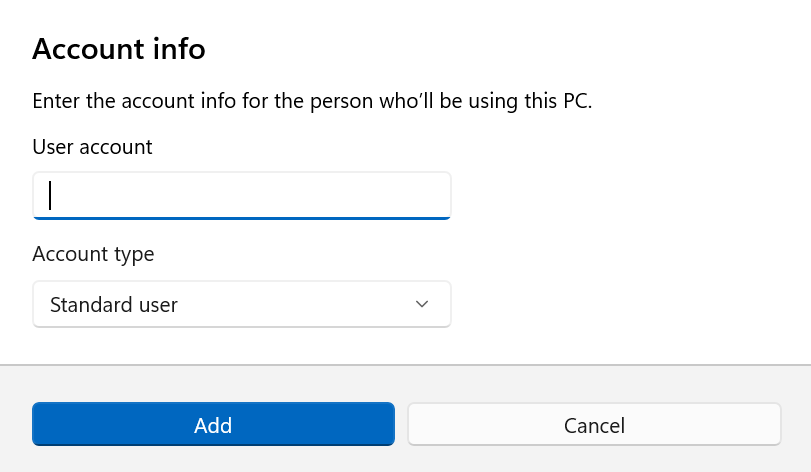
We’re updating the design of dialogs in “Accounts > Other Users” based on modern WinUI framework with support for dark mode:
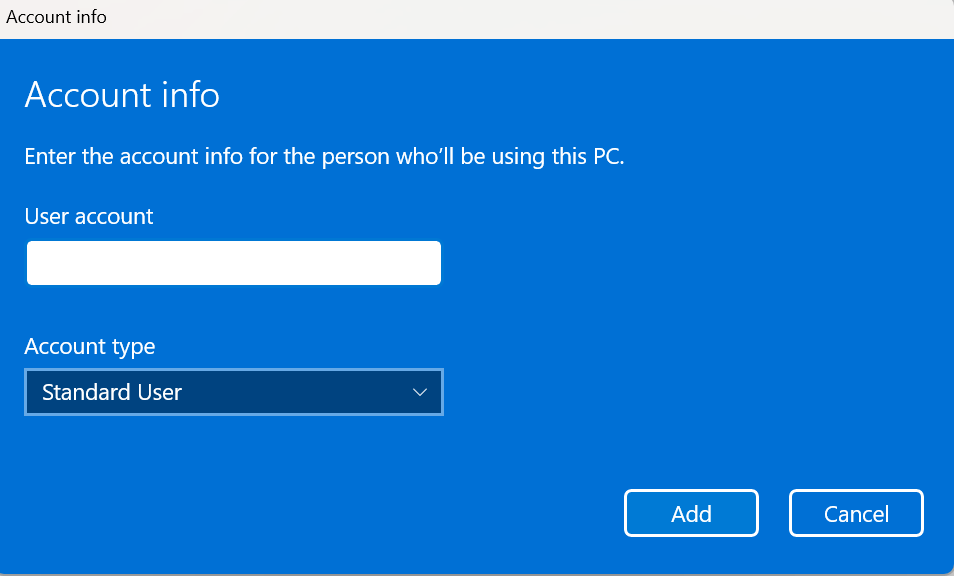
Old 'Add account' dialog user experience for work or school users.
Old ‘Add account’ dialog user experience for work or school users.
New 'Add account' dialog user experience for work or school users.
New ‘Add account’ dialog user experience for work or school users.

Please note that the visibility of the above dialog option depends on whether a domain joined work or school account is configured on the device.
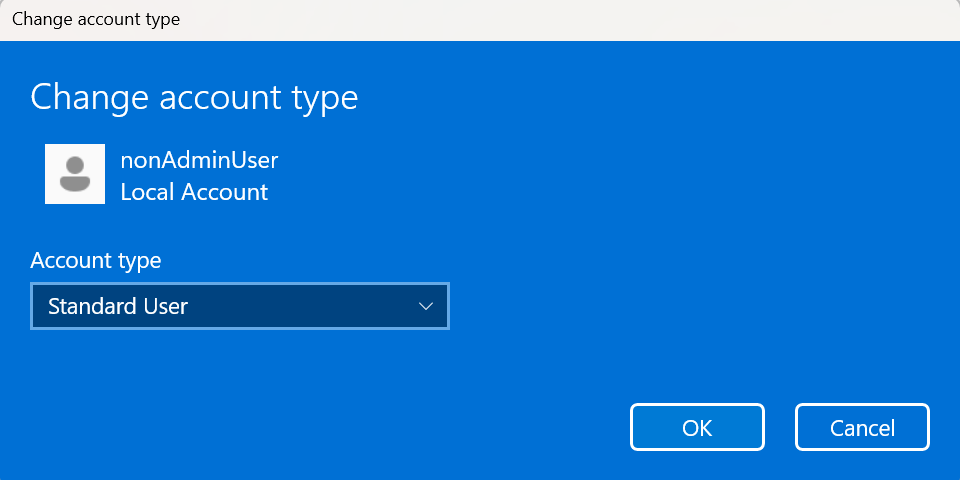
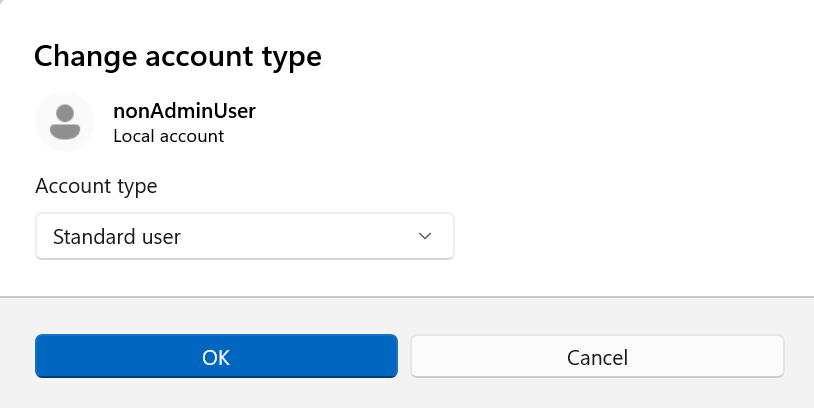
Old 'Change account type' dialog user experience for other users present on the device.
Old ‘Change account type’ dialog user experience for other users present on the device.
New 'Change account type' dialog user experience for other users present on the device.
New ‘Change account type’ dialog user experience for other users present on the device.

Feedback: Please share your feedback in Feedback Hub (WIN + F) under “Settings -> User Profile Account Settings.

[Click to Do]

The Copilot prompt suggestions in Click to Do will now load instantly. This change is not yet rolling out to Windows Insiders in the EEA (European Economic Area) or China.

[Desktop Background]

  • You can now set .webp images for your desktop background in Settings > Personalization > Desktop Background.

Fixes gradually being rolled out with toggle on*

[Taskbar and System Tray]

  • Fixed an issue in the latest builds where, when the taskbar was set to autohide, it might invoke before interacting with the bottom of the screen, blocking the use of apps in that area.
  • Fixed a recent issue which was causing the Start menu, notification center, and quick settings to not open on click sometimes, although using the keyboard shortcuts for each of these still worked.

[Start menu]

  • Fixed a memory leak when opening the Start menu, which could lead to performance issues over time.
  • Fixed an issue for Arabic and Hebrew users, where Start menu was opening on the wrong side of the screen when the taskbar icons weren’t centered.
  • Fixed an issue where if you opened a folder of pinned apps in Start menu and tried to pan it with touch, it would dismiss Start menu.

[Bluetooth]

  • Fixed an issue causing Bluetooth device battery level to not show for some Insiders after the latest builds, even though the devices supported it.

[Xbox full screen experience for PC]

  • This build fixes some unexpected app and game behavior when using FSE. We’re continuing to validate scenarios and as such keeping the known issue active for now. Thank you Insiders that have been sharing feedback!

[Login and Lock Screens]

  • Fixed an issue which could cause the password icon to appear blank on the login screen.

[Settings]

  • Fixed an issue causing Settings to crash when interacting with audio devices in the last two builds.
  • Fixed an issue where the keyboard character repeat delay in Settings > Bluetooth & Devices > Keyboard was backwards from how it was set in the backend.

[Other]

  • Fixed a few issues with clipped text in msinfo32 when using a high display scaling.
  • Fixed an issue impacting some Insiders where clicking on .appinstaller files to install MSIX packages was unexpectedly failing with an invalid argument error.
  • Fixed an underlying issue which was causing Notepad to not display an underscore in text with certain fonts when your display was set to 125%.
  • Fixed an underlying issue which could cause explorer.exe to hang when first logging into your PC, if certain apps were configured as startup apps. This could make the taskbar not appear.

Known issues

[Xbox full screen experience for PC]

  • Some apps may behave unexpectedly when using FSE, particularly those that expect to be locked to a given size or launch additional windows.

[Taskbar & System Tray]

  • We’re investigating an issue where for some Insiders apps aren’t showing in the system tray when they should be.

[Display & Graphics]

  • [NEW] We’re working on the fix for an issue causing secondary monitors to not display correctly and show black screens after the latest updates for a small number of Insiders.

[Click to Do]

  • We’re working on the fix for an issue where the Microsoft 365 Copilot prompt box on selected images does not function if the Microsoft 365 Copilot app is not running.

Reminders for Windows Insiders in the Dev & Beta Channels

  • Updates are based on Windows 11, version 25H2 via an enablement package (Build 26220.xxxx).
  • Many features are rolled out using Controlled Feature Rollout technology, starting with a subset of Insiders and ramping up over time as we monitor feedback to see how they land before pushing them out to everyone in this channel.
  • For Windows Insiders who want to be the first to get features gradually rolled out to you, you can turn ON the toggle to get the latest updates as they are available via Settings > Windows Update*. Over time, we will increase the rollouts of features to everyone with the toggle turned on. Should you keep this toggle off, new features will gradually be rolled out to your PC over time once they are ready.
  • Features and experiences included in these builds may never get released as we try out different concepts and get feedback. Features may change over time, be removed, or replaced and never get released beyond Windows Insiders. Some of these features and experiences could show up in future Windows releases when they’re ready.
  • Some features in active development we preview with Windows Insiders may not be fully localized and localization will happen over time as features are finalized. As you see issues with localization in your language, please report those issues to us via Feedback Hub.
  • Check out Flight Hub for a complete look at what build is in which Insider channel.

Thanks,
Windows Insider Program Team

Source: https://blogs.windows.com/windows-insider/2026/01/16/announcing-windows-11-insider-preview-build-26220-7653-beta-channel/

Windows Update Logo

Thẻ: Beta Channel
BÀI TRƯỚC

KB5072046 Windows 11 Insider Dev and Beta build 26220.7535 (25H2)

BÀI VIẾT TƯƠNG TỰ

WINDOWS INSIDER

KB5072046 Windows 11 Insider Dev and Beta build 26220.7535 (25H2)

10 Tháng 1, 2026
4
WINDOWS INSIDER

KB5072043 Windows 11 Insider Dev and Beta build 26220.7523 (25H2)

20 Tháng 12, 2025
40
Windows 11 Insider Canary
WINDOWS INSIDER

KB5073095 Windows 11 Insider Canary build 28020.1362 (26H1)

16 Tháng 12, 2025
35
WINDOWS INSIDER

KB5070316 Windows 11 Insider Dev and Beta build 26220.7344 (25H2)

8 Tháng 12, 2025
2
WINDOWS INSIDER

KB5070311 Windows 11 Insider Release Preview build 26100.7309 (24H2) and 26200.7309 (25H2)

27 Tháng mười một, 2025
46
WINDOWS INSIDER

KB5070307 Windows 11 Insider Dev and Beta build 26220.7271 (25H2)

22 Tháng mười một, 2025
21
0 0 Phiếu bầu
Article Rating
Theo dõi
Đăng nhập
Notify of
guest

guest

0 BÌNH LUẬN
Inline Feedbacks
Xem tất cả các bình luận

BỘ CÀI WINDOWS ĐƯỢC YÊU THÍCH

Bộ cài Windows 10 Pro 22H2

Bộ cài Windows 10 Pro 22H2 x64

8 Tháng 12, 2025
62.9k
Bộ cài Windows 10 version 22H2 nguyên gốc

Bộ cài Windows 10 version 22H2 nguyên gốc

8 Tháng 12, 2025
26.4k
Bộ cài Windows 10 Enterprise LTSC 2021

Bộ cài Windows 10 Enterprise LTSC 2021

8 Tháng 12, 2025
22.1k
Bộ cài Windows 11 All In One

Bộ cài Windows 11 25H2 All In One

8 Tháng 12, 2025
21.7k
Bộ cài Windows 10 All In One

Bộ cài Windows 10 22H2 All In One

8 Tháng 12, 2025
18.2k
Bộ cài Windows 7 Ultimate All In One

Bộ cài Windows 7 Ultimate

1 Tháng 7, 2025
15.6k
Bộ cài Windows 7 SP1 All In One

Bộ cài Windows 7 SP1 All In One

8 Tháng 12, 2025
14.7k
Bộ cài Windows 10 Enterprise LTSC 2019

Bộ cài Windows 10 Enterprise LTSC 2019

8 Tháng 12, 2025
14.4k
Bộ cài Windows 11 Pro version 22H2

Bộ cài Windows 11 Pro version 22H2

8 Tháng 12, 2025
14.4k
Bộ cài Windows 10 Pro version 21H2 x64

Bộ cài Windows 10 Pro version 21H2 x64

4 Tháng 7, 2025
13.1k

BỘ CÀI WINDOWS MỚI

Bộ cài Windows 11 Pro 25H2

Bộ cài Windows 11 Pro 25H2

8 Tháng 12, 2025
678
Bộ Cài Windows 11 Pro Workstation 25H2

Bộ cài Windows 11 Pro for Workstations 25H2

8 Tháng 12, 2025
243
Bộ Cài Windows 11 Enterprise 25H2

Bộ cài Windows 11 Enterprise 25H2

8 Tháng 12, 2025
294

Bộ cài Windows 11 Enterprise GS 25H2

8 Tháng 12, 2025
411
Bộ cài Windows 11 Enterprise G 25H2

Bộ cài Windows 11 Enterprise G 25H2

8 Tháng 12, 2025
193
Bộ cài Windows 11 Enterprise LTSC 25H2

Bộ cài Windows 11 Enterprise LTSC 25H2

8 Tháng 12, 2025
681
Windows 11 25h2 nguyên dốc

Bộ cài Windows 11 version 25H2 nguyên gốc

8 Tháng 12, 2025
766
Bộ cài Windows 10 Enterprise GS 22H2

Bộ cài Windows 10 Enterprise GS version 22H2

8 Tháng 12, 2025
1.2k
Bộ cài Windows 10 Pro for Workstation 22H2

Bộ cài Windows 10 Pro for Workstations version 22H2

31 Tháng 7, 2025
1.5k
Bộ cài Windows 10 Enterprise G 22H2

Bộ cài Windows 10 Enterprise G 22H2

8 Tháng 12, 2025
506

DONATE MANHPC.COM

MANHPC

Website chia sẻ kiến thức Hệ điều hành Windows miễn phí

Email: contact@manhpc.com

DMCA.com Protection Status

SERIES BÀI VIẾT

  • Hướng dẫn Rebuild Windows

  • Hướng dẫn cấu hình file trả lời tự động

  • Bộ cài Windows 7

  • Bộ cài Windows 10

  • Bộ cài Windows 11

  • Bộ cài Windows nguyên gốc

© 2025 MANHPC BLOG

Trang chủ   Liên hệ   Chính sách bảo mật   Sơ đồ trang   Donate

Không có kết quả
Xem tất cả kết quả
  • TRANG CHỦ
  • HƯỚNG DẪN
  • HỆ ĐIỀU HÀNH
    • MANHPC
      • NEWEST
      • NEWEST UPDATE
      • MOST VIEW
    • TIN TỨC
      • WINDOWS INSIDER
  • WINDOWS PE
  • SERIES
    • HƯỚNG DẪN REBUILD WINDOWS
    • HƯỚNG DẪN CẤU HÌNH FILE TRẢ LỜI TỰ ĐỘNG
    • BỘ CÀI WINDOWS NGUYÊN GỐC
      • Windows 11
      • Windows 10
    • BỘ CÀI WINDOWS 11
      • Windows 11 25H2
      • Windows 11 24H2
      • Windows 11 23H2
      • Windows 11 22H2
      • Windows 11 21H2
      • Windows 11 LTSC
    • BỘ CÀI WINDOWS 10
      • Windows 10 22H2
      • Windows 10 21H2
      • Windows 10 21H1 và 2004
      • Windows 10 LTSC
    • BỘ CÀI WINDOWS 7
  • CHỦ ĐỀ
  • GOOGLE NEWS
  • DONATE
  • DỊCH VỤ
  • LIÊN HỆ

© 2021 ManhPC Blog - All Right Reserved.

Liên hệ
Fanpage
wpDiscuz